API Basics: What is an API?
OVERVIEW:
In the current era of software development, API (Application Programming Interface) plays a pivotal role, helping different applications, services, and systems to "talk" and exchange data with each other effectively.
Before going into the concepts of each basic API style, you first need to understand what an API is.
- What is an API?
- API stands for Application Programming Interface.
- It is a set of rules and methods that allow different software to interact and exchange data with each other.
- How does an API work?
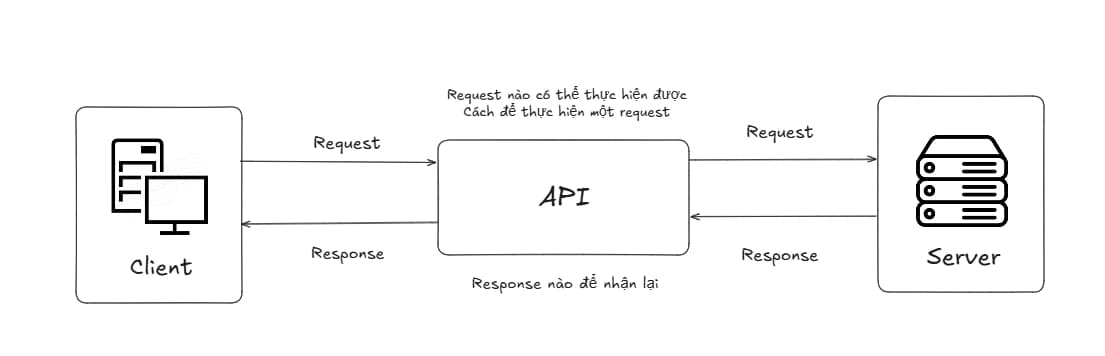
- When a client sends a request to a server, the API acts as the intermediary between the client and the server to handle requests such as:
- Which requests can be performed
- How to perform the request
- Which response to receive back
- Most modern APIs operate based on the HTTP/HTTPS protocol, and usually exchange data in JSON format (sometimes XML or binary).
- Why are there many different types of APIs?
- Depending on specific needs for performance, flexibility, data volume, and deployment environment (public API or internal microservices), developers have designed many different API styles.
- In this article, we will take a deep dive into the three most popular and important API styles today:
- REST API — The classic style, easy to understand and most widely used.
- GraphQL — The flexible style, allowing the client to define the data to be fetched.
- gRPC — The high-performance style, suitable for communication between microservices.
- After reading, you will clearly understand the pros and cons of each style and know when to use which style in real-world projects.
I. REST API:
- Concept:
- Representational State Transfer is an architectural style in which resources are accessed and manipulated through HTTP using standard methods such as GET, POST, PUT, DELETE.
- Operational structure:
Each resource is represented by a unique endpoint, and can be accessed or manipulated through standard HTTP methods such as:
Method Function Example GET Retrieve resource data GET /users– Get user listPOST Create a new resource POST /users– Create a new userPUT Update entire resource PUT /users/1– Update info for user #1PATCH Update part of a resource PATCH /users/1– Update only the user's emailDELETE Delete resource DELETE /users/1– Delete user with ID = 1Basic operational process:
- Client sends a request with HTTP method + URL + (optional body and query params).
- Server identifies the resource based on the URL and method.
- Server calls service/business logic → interacts with Database.
- Returns a response in JSON format (most common) with an HTTP Status Code to represent the result.
STATUS CODE Function Example 2xx Success 200 OK– Success201 Created– Successfully created3xx Redirection 301 Moved Permanently- Permanently moved to a new URL4xx Client Error 400 Bad Request– Invalid data404 Not Found– Resource not found5xx Server Error 500 Internal Server Error– Server-side error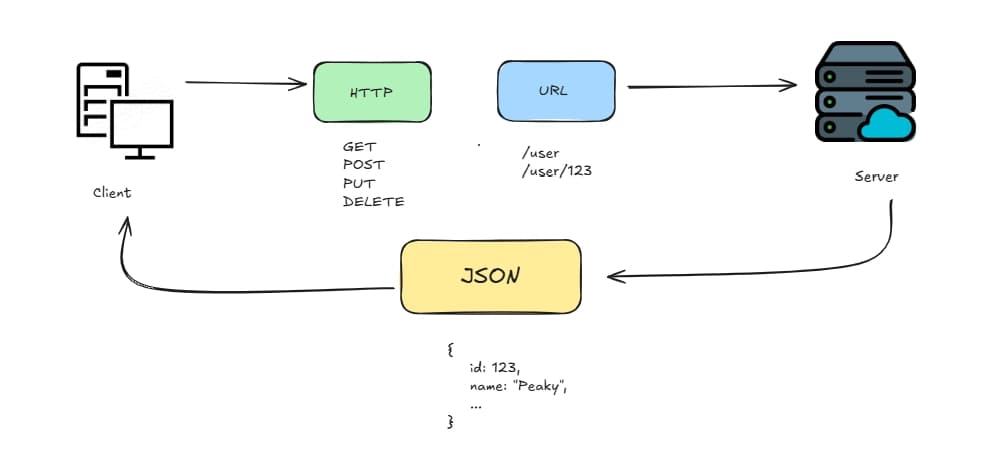
- Example:
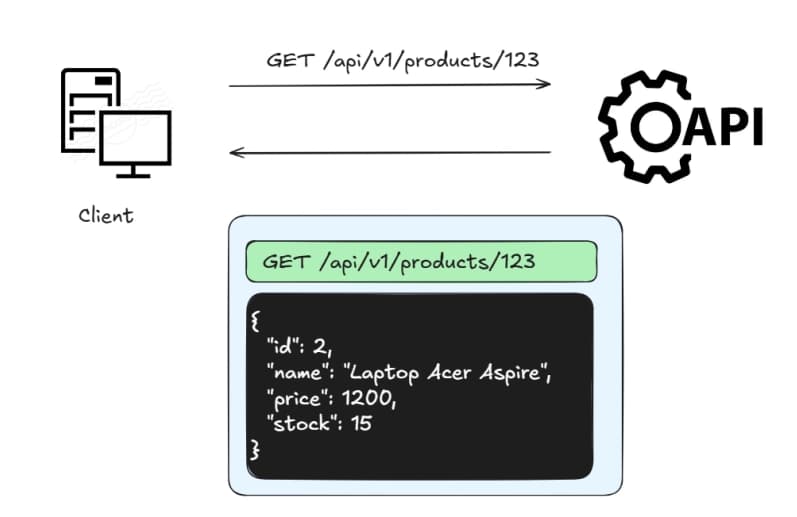
Explanation:
- Client sends a request with method GET → intent to fetch data.
- Server reads URL and method, queries database, returns JSON containing the correct product information.
- If not found: returns 404 Not Found.
- Applications:
- Public APIs (Twitter/X API, GitHub API, Stripe...).
- Web services, backend for mobile/web apps.
Pros/Cons:
a. Pros:
Easy to understand, learn, and implement.
Popular, large community support, high compatibility with all languages and clients (browser, mobile...).
Stateless → easy to scale horizontally.
Supports good caching via HTTP headers.
Can be easily tested with tools like Postman, curl.
b. Cons:
Prone to over-fetching (fetching extra data) and under-fetching (having to call multiple requests).
The number of endpoints can increase significantly as the application becomes complex.
Not optimized for real-time (requires combination with WebSocket).
Versioning and managing changes can become complex over time.
II. GraphQL:
- Concept:
- GraphQL is a data query language that allows the client to request exactly the data they need from the server, through only one single endpoint (
/graphql). - The client sends a query describing the desired data structure, and the server will return exactly those fields, no more and no less.
- Architecture:
GraphQL includes three main parts:
a. Schema: Defines data types, queries, mutations, and the relationships between them.
b. Resolvers: Logic handling functions for each field in the schema. They decide where data is fetched from (database, other services…).
c. Runtime: Engine that executes GraphQL queries and returns results.
Main types of operations:
- Query: used to fetch data from API (equivalent to GET in REST)
query {
  getTodos {
    id
    title
    completed
  }
}
- Mutation: used to perform data changes (equivalent to POST, PUT, DELETE)
mutation {
  addTodo(title: "Learn GraphQL") {
    id
    title
    completed
  }
}
- Subscription: used to receive real-time data when changes occur:
subscription {
  onPostAdded {
    id
    title
    author {
      name
    }
  }
}
- Operational structure:
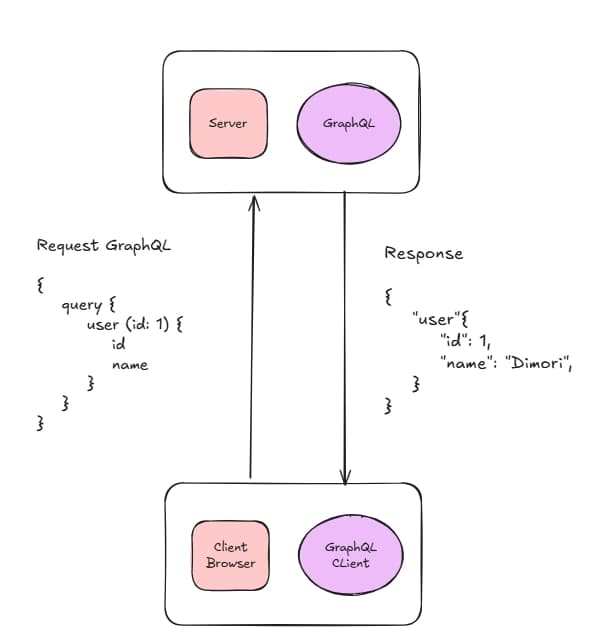
- Client sends a query to the endpoint /graphql.
- Server receives query, checks validity according to the Schema.
- Based on Resolvers, server collects data from multiple sources (potentially from multiple database tables in just one request).
- Returns response in JSON format with a structure exactly as requested by the client.
- Example:
Request:
query {
  user(id: 1) {
    id
    name
  }
}
Response:
{
  "data": {
    "user": {
      "id": 1,
      "name": "Dimori"
    }
  }
}
- Applications:
- Social networking applications (Facebook, Instagram).
- Complex E-commerce (Shopify).
- Mobile/web apps that need flexible data and reduced request counts.
Pros and Cons:
a. Pros:
Only one single endpoint for the entire API.
Avoids over-fetching and under-fetching: client only receives the exact data needed.
Reduces the number of requests (one query can fetch multiple related pieces of information).
Clear Schema, automatically generated documentation (GraphQL Playground, Apollo Studio).
Strong support for versioning (adding new fields without breaking old clients).
Effectively solves the N+1 query problem when designing resolvers correctly.
b. Cons:
Harder to implement and debug than REST (especially for beginners).
Cannot leverage standard HTTP caching mechanisms (requires separate cache layer like Apollo Cache or Redis).
Prone to deep nesting or queries that are too complex if the server lacks limits (rate limiting, query complexity).
Always returns HTTP status code 200 OK, whether query is successful or failed. Errors are returned in the "errors" field → requires careful error handling on the client side.
III. gRPC:
- Concept:
- RPC (Remote Procedure Call) is a network technical model, a communication protocol between software (or processes) where a program can request a service from another program located in a different computer/server, or simply understood as a method of calling a function from a remote computer to get a result.
- Google Remote Procedure Call (gRPC) is a high-performance communication framework developed by Google, allowing applications to call remote functions or methods as if they were located within the same program.
- Operational structure:
- Service definition: Developers describe the functions (RPCs) that the server provides in a
.protofile. This helps both sides (client and server) understand each other accurately and in a type-safe manner.
Example of a .proto file:
syntax = "proto3";

service UserService {
  rpc GetUser (UserRequest) returns (UserResponse);
}

message UserRequest {
  int32 id = 1;
}

message UserResponse {
  int32 id = 1;
  string name = 2;
  string email = 3;
}
- Execution (Call): In the code of the Order Service, the developer simply calls the function
paymentClient.CheckBalance({ user_id: 123 }). For them, this call feels exactly like calling a local function, even though the Payment Service might be running on a different server. - Serialization: The gRPC Client Stub will take the number
{ user_id: 123 }, check it against the definition file, and compress it into an ultra-small binary byte string. - Transport: This byte string is sent through a pre-established HTTP/2 stream. Thanks to HTTP/2, this connection is not closed after each call, helping minimize latency.
- Processing at Server: Payment Service receives the byte string, decodes it back into a number, queries Database, and retrieves the balance.
- Response: The result (balance and status) is again compressed into binary and sent back to the Order Service to complete the order process.
- Applications:
- Internal communication between microservices (this is the most common use case).
- Systems requiring high performance and low latency: fintech, trading, IoT, video streaming, gaming backend.
- Applications needing real-time data streaming (bidirectional streaming).
Note: gRPC is less commonly used for public APIs (APIs for third parties or browsers) because binary data and HTTP/2 are not browser-friendly.
Pros and Cons:
a. Pros:
Superior performance: Low latency, high throughput thanks to binary + HTTP/2.
Strong support for streaming (unary, server, client, bidirectional).
Contract-first with Protobuf → type-safe, auto-generated code, fewer errors.
Easy integration in polyglot (multi-language) environments and microservices.
Good support for authentication, load balancing, deadlines, and cancellation.
b. Cons:
Not browser-friendly (poor browser support, usually requires gRPC-Web).
Harder to debug because data is binary (not directly readable like JSON).
Higher learning curve than REST and GraphQL.
More complex configuration and tooling when deploying to production.
Less suitable for public APIs (usually combined with a gateway to convert to REST/GraphQL for external clients).
IV. Comparison Summary:
| Criteria | REST API | GraphQL | gRPC |
|---|---|---|---|
| Architecture | Resource-based | Query-based | RPC-based |
| Number of Endpoints | Multiple endpoints | One single endpoint (/graphql) | Multiple services/methods |
| Transport Protocol | HTTP 1.1 / HTTP 2 | HTTP 1.1 / HTTP 2 | HTTP 2 (Required) |
| Data Format | JSON (Text) | JSON (Text) | Protobuf (Binary) |
| Flexibility | Medium (Fixed) | Very High (Client-defined) | Low (Strict Contract) |
| Performance & Speed | Fair | Medium (due to Query processing overhead) | Extremely Fast |
| Difficulty (Learning Curve) | Low | Medium | High |
| Browser Suitability | Very Good | Good | Poor (needs gRPC-Web) |
| Caching | Good (using HTTP cache) | Medium (needs separate cache layer) | Medium |
| Best Use Case | Public API, Traditional Web App | Web/Mobile App needing flexible data | Internal Microservices, Real-time, IoT |
SUMMARY:
- REST API: The default and safest choice for most projects. Should be used when:
- Building a Public API (API for third parties).
- Simple to medium projects needing high compatibility.
- New teams or wanting rapid development.
- GraphQL: Should be used when:
- Frontend/mobile applications need flexible data, avoiding over-fetching/under-fetching.
- Projects have many complex data relationships (social networks, e-commerce, dashboard…).
- Wanting to reduce the number of requests between client and server.
- gRPC: The most optimal choice when:
- Building internal communication between microservices.
- Systems demand high performance, low latency, and large throughput (fintech, IoT, gaming, AI…).
- Needing strong real-time data streaming support.