# User Guide – n8n Workflow for Posting to Facebook Page (Text + Image/Video)
Content
This document provides a detailed guide on how to use an n8n workflow to automatically post content with images or videos to a Facebook Page, supporting instant publishing or scheduled posting via Meta Business Suite.
1. Workflow Overview
1.1 Introduction
The n8n Blog on FB Page workflow is designed to automate the entire process of posting content to a Facebook Page, including Image Posts and Video / Reel, with the ability to:
- Publish instantly
- Schedule posts
- Create draft posts for admin review in Meta Business Suite
This workflow is especially suitable for integration with Notion / AI Agent / CMS / Internal Forms.
1.2 Objectives
The workflow is built to:
- Automatically post text content + image or video to a Facebook Page
- Support instant publishing
- Support scheduled posting and management in Meta Business Suite
- Apply to image posts, video posts, and video reels
1.3 Suitable Use Cases
- Automating blog posting from CMS / AI / Notion
- Scheduling marketing content for Facebook Page
- Standardizing posting workflow for content teams
2. Overall Workflow Architecture
2.1 Workflow Operating Principles
This section explains how the workflow runs from start to finish, helping you understand why multiple nodes are required and why Facebook API must be processed step by step.
2.1.1 High-level Principle
Overall flow diagram:
[Start / Form / Webhook]
           │
           ▼
  [Check Media Type]
     ┌───────────┴───────────┐
     ▼                       ▼
[Image Flow]           [Video / Reel Flow]
     │                       │
     ▼                       ▼
[Upload Media
 (unpublished)]      [Upload Video]
     │                       │
     ▼                       ▼
[Aggregate Media IDs]   [Check Video Status]
     │                       │
     └───────────┬───────────┘
                 ▼
          [Create Post]
       (Publish Now / Scheduled)
                 │
                 ▼
         [Meta Business Suite]
                 │
                 ▼
         [Log / Email / DB]
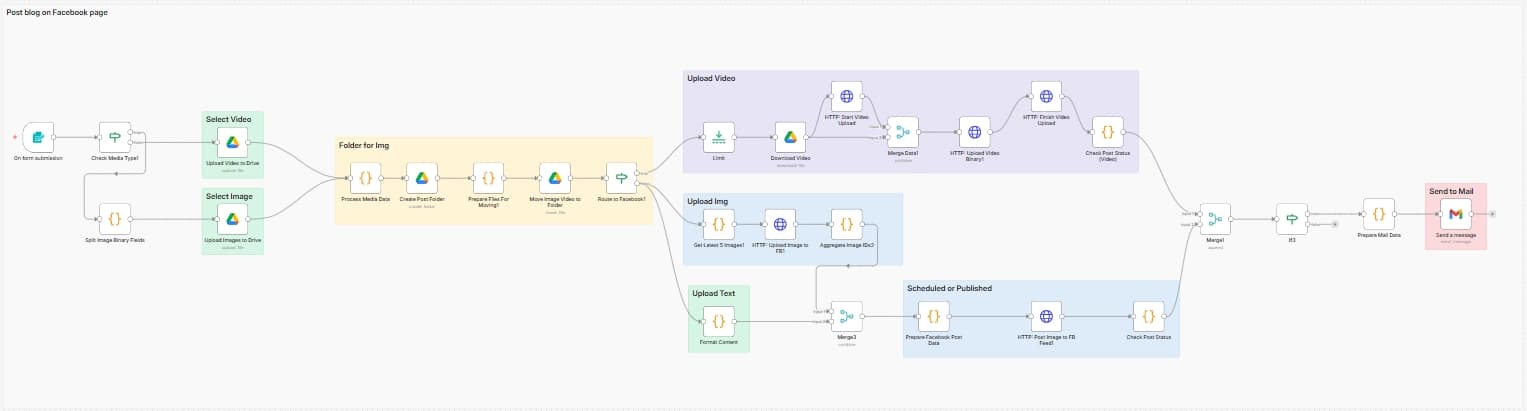
The workflow follows a Pipeline + Router model:
- Receive input (text + image/video + config)
- Classify content (Image vs Video)
- Pre-process media (upload unpublished)
- Create post (publish now or scheduled)
- Monitor status & notify results
Facebook does not allow uploading media and publishing in a single step for advanced cases (multi-image, scheduled, video).
Important Note
- Facebook Graph API requires:
- Upload media first (image / video)
- Then create the post
- If trying to combine steps:
- Post may not appear
- No
permalink_url- Silent errors may occur (API returns success but no post)
Therefore, the workflow must be split into multiple nodes for stability.
2.1.2 Image Post Processing Principle
For Image Posts, the workflow follows:
Upload media first → aggregate IDs → create post
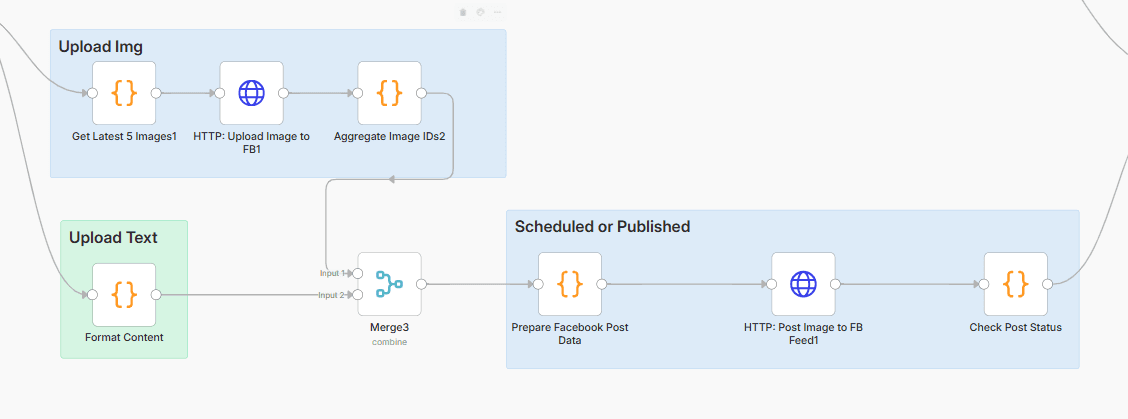
Specifically:
- Images are uploaded with
published = false - Facebook returns
media_fbidfor each image - The workflow aggregates them into
attached_media[] - Send request to create post:
published = true→ publish immediatelypublished = false + scheduled_publish_time→ schedule post
Why is this required?
This approach helps:
- Post multiple images in one post
- Create Draft / Scheduled posts in Meta Business Suite
- Allow admin editing before publishing
This is Meta’s recommended approach for production workflows.
2.1.3 Video / Reel Processing Principle
Videos cannot be published immediately after upload because Facebook needs processing time.
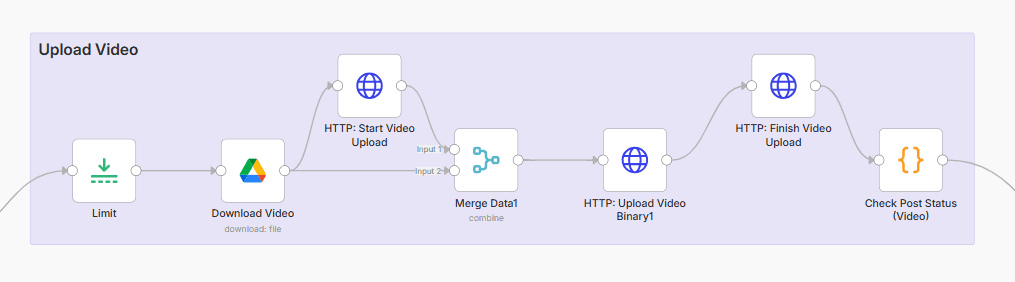
Required process:
- Upload video (chunk/binary)
- Receive
video_id - Continuously check video status
- Only publish when status is
ready
If skipping status check:
Common Video Issues
- Video uploaded but not visible on Page
- Cannot publish even if API returns
success = true- Cannot get
permalink_url
Mandatory rule: Only publish when status = ready
For Video Reels:
- Apply similar logic as Image
- Can use
scheduled_publish_time
2.1.4 Router & If Node Principles
The workflow uses multiple If / Router nodes to ensure:
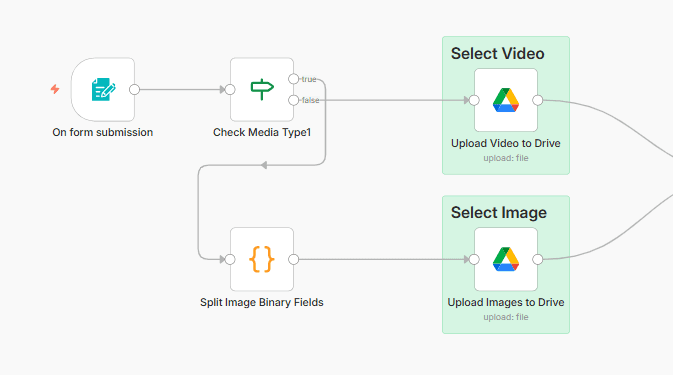
- Correct content type → correct flow
- Avoid wrong publish timing
- Easy to extend later
Common conditions:
has_video === true/falsepublish_mode === now/scheduledvideo_status === ready
Benefits:
- Fewer bugs
- Easier debugging
- Easy for team understanding
2.1.5 Workflow Design Principles
This workflow is designed to:
- Run reliably in production
- Be easy to debug when Facebook API changes
- Be easy to understand for other developers
Design principles:
- Single Responsibility: each node does one clear task
- Fail-safe: do not publish if media is not ready
- Observable: always produce logs/output
- Extensible: easy to integrate AI, CMS, DB
This is why the workflow is long but very stable in production.
2.2 Main Flows
The workflow includes 3 main flows:
Image Flow
- Upload images
- Create image post
- Publish or schedule
Video / Reel Flow
- Upload video
- Create video/reel post
- Check video status
- Publish or schedule
Router Flow
- Branch by content type (image / video)
- Branch by mode (publish now / scheduled)
3. Workflow Inputs
The workflow receives the following main inputs:
3.1 Post Content
message: Text content of the post- Can be sourced from:
- Webhook
- Notion
- Google Sheet
- AI Agent (ChatGPT / Claude)
3.2 Media
- Image: URL or binary image file
- Video: URL or binary video file
3.3 Posting Configuration
post_type:image|videopublish_mode:now|scheduledscheduled_time: posting time (timestamp, ISO format)
4. Image Post Processing Flow
The Image flow is triggered when no video file is uploaded from the form.
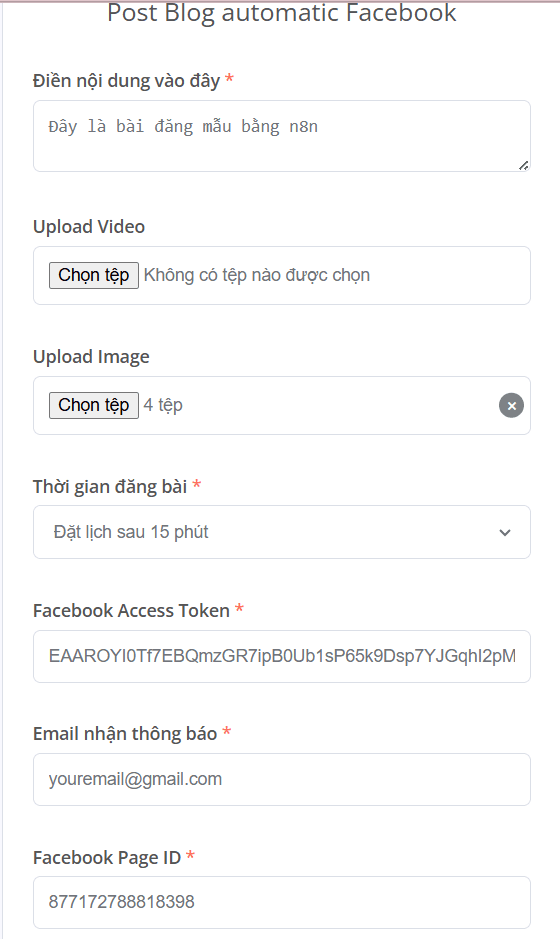
4.1 On form submission
Form Usage Tips
- Validate input directly at the form level (require content, media)
- If used for a content team, only expose necessary fields
- Access Token & Page ID should be set as default (hidden fields)
Node: On form submission
Function:
- Receive user input via Form Trigger
Important fields:
- Enter content here →
content - Upload Image → binary image
- Posting time → publish mode
- Facebook Access Token
- Facebook Page ID
- Notification email
4.2 Check Media Type
Node: Check Media Type1
Function:
- Check whether a video exists
- If no video → go to Image processing flow
4.3 Split Image Binary Fields
Node: Split Image Binary Fields
Function:
- Split multiple uploaded images into individual items
- Normalize binary field to
Upload_Image
Reason for this node:
- Facebook API requires uploading images one by one
4.4 Upload Images to Drive
Node: Upload Images to Drive
Function:
- Upload each image to Google Drive
- File naming format:
yyyyMMdd_HHmmss_image_index.jpg
4.5 Process Media Data
Node: Process Media Data
Function:
- Aggregate all post information:
- content
- media_type = Image
- publish_now / scheduled_time
- page_id
- access_token
Important logic:
- If scheduled →
publish_now = false - Calculate
scheduled_timeby minute/hour
4.6 Create Post Folder & Move Media
Nodes:
- Create Post Folder
- Prepare Files For Moving1
- Move Image Video to Folder
Function:
- Create folder with format
FB_Post_yyyyMMdd_HHmmss - Move all images into the correct folder
4.7 Upload Image to Facebook (Unpublished)
Important Note
Always set
published = falsewhen uploading images.If set to
true:
- Facebook will publish each image separately
- Cannot group multiple images into one post
- Cannot use scheduling
Node: HTTP: Upload Image to FB1
Function:
- Upload images to Facebook Page with:
published = false
Response:
- Returns
idfor each image (media_fbid)
4.8 Aggregate Image IDs
Node: Aggregate Image IDs2
Function:
- Combine all
media_fbidinto an array - Prepare data for post creation
4.9 Prepare Facebook Post Data
Node: Prepare Facebook Post Data
Function:
- Normalize payload for Facebook Feed API
Payload includes:
- message
- attached_media
- published
- scheduled_publish_time
4.10 Post Image to Facebook Feed
Node: HTTP: Post Image to FB Feed1
Result:
- Returns
post_id - Post can be:
- published
- scheduled
4.11 Upload Images to Facebook
- The workflow calls Facebook Graph API to upload images
- Images are uploaded with:
published: false(if scheduled)- or published immediately
4.12 Create Post from Images
- After successful upload:
- Retrieve
media_fbid - Attach them to the post
- Retrieve
4.13 Publish or Schedule
- Publish immediately:
published: true
- Schedule post:
published: falsescheduled_publish_time- Post appears in Meta Business Suite for editing
5. Video / Reel Processing Flow
5.1 Upload video
- Video is uploaded first as draft
- Returns:
video_id
5.2 Check video status
Video Best Practice
- Do not publish immediately after upload
- Always check status until
ready- For long videos, implement delay / retry logic
The workflow uses node Get Status Video / Reel to:
- Check whether video processing is complete
- Prevent publishing when video is not ready
5.3 Publish or Scheduled
- When video status is
ready:- Publish immediately or
- Schedule using
scheduled_publish_time
- For video reels:
- Can apply scheduling logic similar to images
6. Important Logic Nodes
6.1 Node Check Post Status (Video)
- Check:
- Whether video upload is complete
- Whether it is ready to publish
6.2 Node If / Router
- Branch based on:
post_typepublish_mode
6.3 Node Prepare Post Data
- Normalize payload sent to Facebook API
- Map fields:
- message
- media
- scheduled time
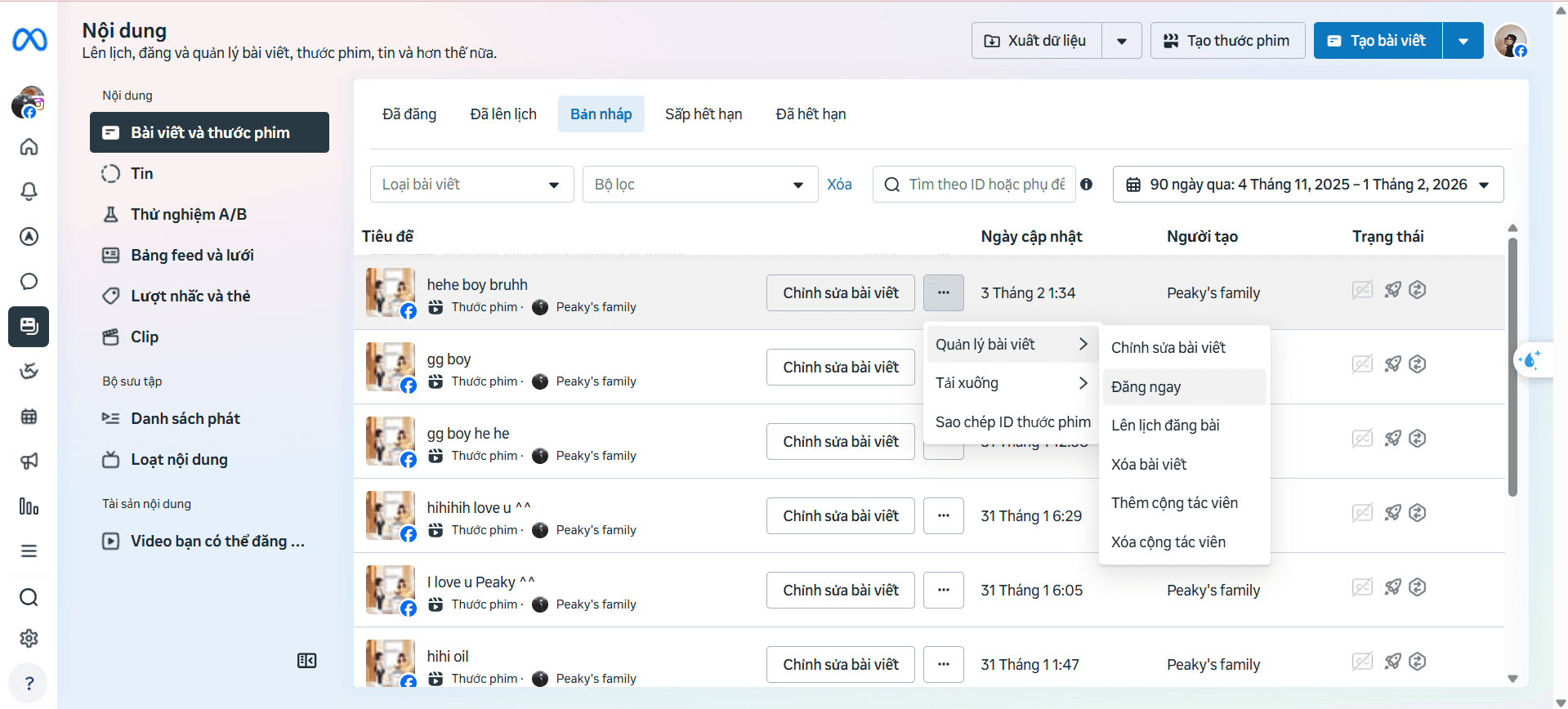
7. Managing Posts in Meta Business Suite
- For posts with
published: false+scheduled_publish_time: - The post will appear in Meta Business Suite
- Admin can:
- Edit content
- Change posting time
- Publish manually
8. Common Issues & Solutions
Quick Debug Tips
When the workflow fails:
- Check HTTP node output
- Compare payload with Facebook Graph API docs
- Test with immediate publish first, then scheduled
8.1 Upload successful but no post appears
- Check:
publishedisfalse- Post is in scheduled state
8.2 Video cannot be published
- Common causes:
- Video not fully processed
- No status check before publishing
- Solution:
- Must use Check Status Video node
8.3 Missing permalink_url
permalink_urlis only available when:- Post is successfully published
9. Workflow Extensions
Possible enhancements:
- Integrate AI for automatic content generation
- Use Notion as CMS
- Automatically log
post_id,permalink_urlto Google Sheet / DB - Add retry & error handling
10. Conclusion
This workflow helps you:
- Standardize Facebook Page posting process
- Save operational time
- Easily scale for multiple content types (image, video, reel)
Suitable for both individuals and marketing teams for long-term use.